If I asked what your number one complaint about Facebook is at the moment, odds on it would be lack of organic post reach.
In other words, you can’t get your posts into enough fans newsfeeds and you’re definitely not getting the likes, comments and all-important shares that you’re looking for.
And I bet that what peeves you even more is that you’re doing all the right things:
- You post on a regular basis
- Your content is definitely not spam
- Each post is on brand message & suits your audience
So now the only thing you can do is pay for reach via Boost Posts, right?
Wrong!
Put down your credit card and I’ll give you 5 simple tactics you can do right now to optimise facebook pages for organic reach.
The added bonus is that these simple tips will not only optimise your Facebook page for Google and Facebook’s own search function, but will create a better user experience for each person who visits your Facebook page.
Win!
1. Get your Facebook page Category right.
Let’s get back to basics. Did you select the right Facebook page Category for your business?
If you can’t remember, go back & check!
There are six different Page Categories to choose from:
- Local Business or Place
- Company Organization or Institution
- Brand or Product
- Artist, Band or Public Figure
- Entertainment
- Cause or Community
If you don’t have a store front or physical location, Company, Organization or Institution may be best for you.
But, if people physically visit your location and you’re not a huge brand – Local Business may be best. This is usually most suitable for a cellar door, bed and breakfast, restaurant etc.
An added bonus of Local Business is that your Facebook Fans can “check-in” at your business. It’s a fantastic promotion tool, because each check-in appears on your Business Page, their Timeline, and their friends’ News Feed.
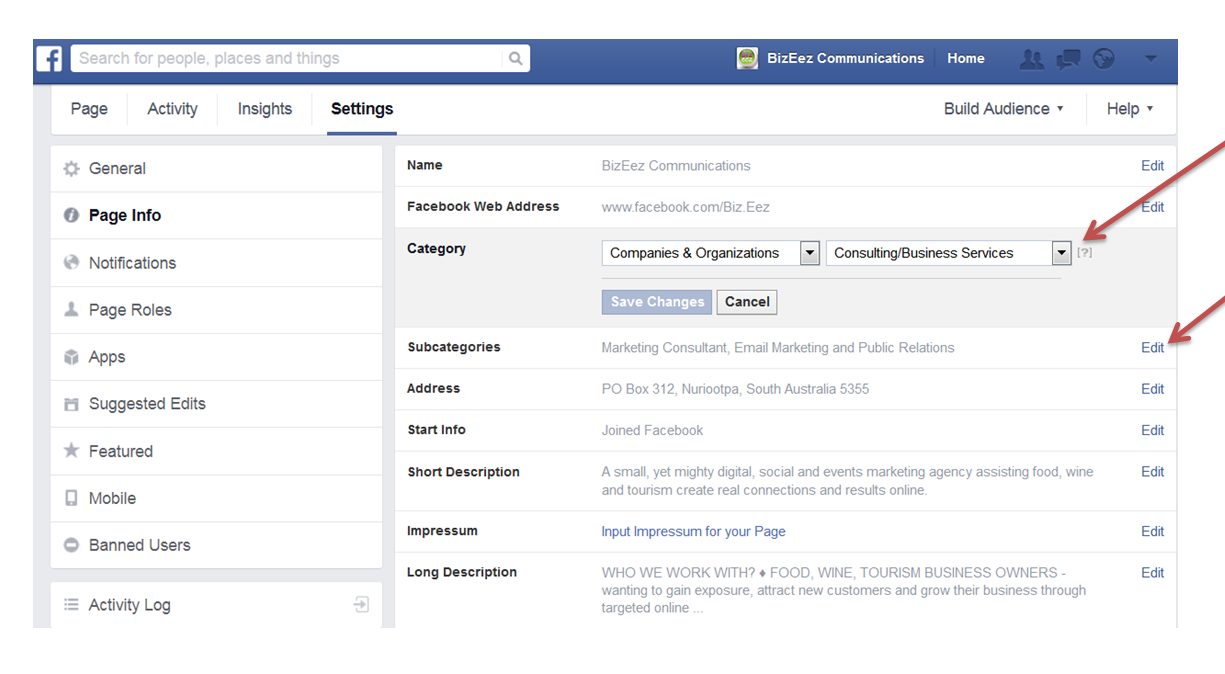
QUICK TIP: You can easily change your Page Category. Simply click on Edit Page and select new options under Category.
2. Smarten up your About section.
Your About section will vary depending on your Page Category.
For Local Business or Place, you can include hours of business, address and phone number.
For those with Company, Organization or Institution, you have around 75 characters to write a description.
So you want to make those words count.
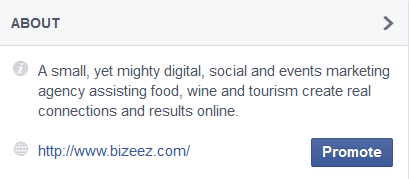
QUICK TIP: Include your primary key words in your About Section.
3. Optimise your Page Info section.
Once again, what you can complete in Page Info will vary depending on what Page Category.
The golden rule here is – the more information, the better.
Get stuck in, filling out as much as you can. Just be sure to keep your SEO hat on.
Keep your keywords in mind and be sure to link to the pages and sites you want to drive business to, as well as other social media. This includes links to:
- your website or blog
- your online store or where you can buy your products/services
- your contact page
- other social media channels such as your Twitter, Linkedin profiles.
QUICK TIP: Keep your Facebook fans top-of-mind. You want your content to sound natural and include helpful links, not to be jam-packed with keywords and URLs.
4. Customise your Facebook Page URL.
Once your Facebook Page reaches 25 Likes, you can create a customised URL (or username in Facebook speak).
If you haven’t done this yet your current username is likely to be something horrendous such as www.facebook.com/your-page-name-1234562111111.
Customising your Facebook URL has two main benefits:
- It’s easier for Facebook users to remember and find you
- It looks more appealing on business cards, promo material, email signature and print media advertising (which in turns makes it more memorable)
But you don’t have to just use your business name – you can search optimise your Facebook URL.
Let’s say you run a cafe called Mikes. Instead of customising the URL to www.facebook.com/mikes you could add your primary keyword, for example, www.facebook/MikesBarossa or www.facebook/MikesCafe.
Just make sure you choose wisely, as you can only do this once!
QUICK TIP: If you want to search optimize your URL, don’t keyword stuff! Just like all SEO, one or two keywords at most will suffice.
5. Ensure your page is mobile-friendly.
There are literally millions of people who use Facebook daily on a mobile device, and this number is only set to increase.
Here are the top ways to optimise your page for mobile users:
- Make sure your phone number is in the right field for easy click-to-call functionality.
- Keep your most important post pinned to the top of your newsfeed.
- Keep text updates short & snappy so they’re easy to read on mobile.
- Be smart about your cover image – on mobile, the page name and profile image covers 50% of the image.
- Double check that any links in your posts can be viewed on mobile devices.
QUICK TIP: Make sure you look at your own Facebook business page on a mobile device to see what potential customers see. Are there any changes needed you can instantly see?
Want more tips on Facebook? Here are a few topics I’ve covered previously.
Let me know how you go optimising your Facebook page. I love to hear feedback on what’s worked and what hasn’t.
Until next time…..